
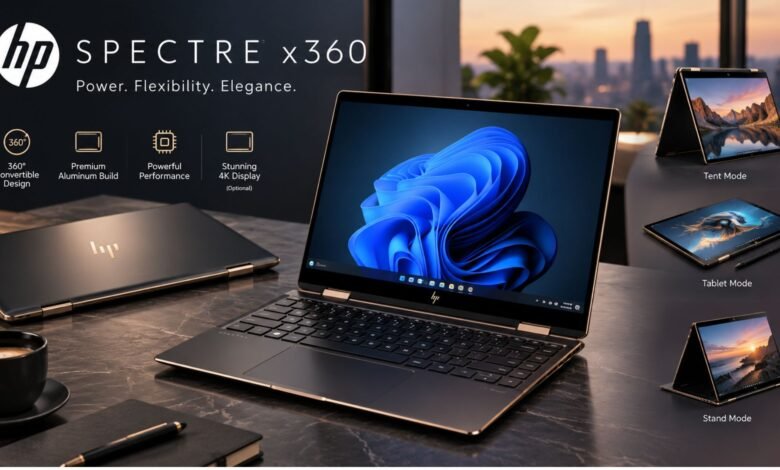
The HP Spectre x360 has long occupied the premium end of the Windows 2-in-1 laptop market, combining a thin aluminium chassis with a 360-degree hinge, touchscreen support and high-resolution display options. It is designed for users who want one computer that can function as a conventional laptop, presentation device and tablet without moving to a separate mobile operating system.
For buyers in the USA and UK, the important issue is no longer simply choosing the fastest specification. Model generations, screen options and availability vary considerably. Some Spectre configurations listed by HP have already been discontinued, so checking the exact product number matters before comparing prices or specifications.

What Makes the HP Spectre x360 Different?
The defining feature is its convertible hinge. The display can rotate through 360 degrees, allowing the computer to operate in laptop, tent, stand or tablet positions. That flexibility is especially useful for presentations, handwritten notes, streaming video and touchscreen-based creative work.
The premium 14-inch generation also introduced hardware aimed at modern productivity. One official HP configuration, the 14-eu0013dx, includes an Intel Core Ultra 7 155H processor, Intel Arc integrated graphics, 16GB of LPDDR5x memory and a 1TB PCIe Gen4 NVMe SSD.
Its 14-inch 3K OLED touchscreen is another major attraction. On comparable Spectre 14 configurations, HP specifies a 2880 × 1800 OLED panel with a variable 48–120Hz refresh rate, 100% DCI-P3 coverage and touchscreen support.
Core Features at a Glance
Specifications differ between generations, so the following table reflects features commonly associated with recent premium 14-inch models rather than every Spectre ever produced.
| Feature | What Buyers Can Expect |
|---|---|
| Form factor | Convertible 2-in-1 with 360-degree hinge |
| Display | Up to 3K OLED touchscreen on selected models |
| Processor | Intel Core Ultra processors on newer 14-inch versions |
| Graphics | Intel Arc integrated graphics on Core Ultra configurations |
| Memory | Commonly 16GB onboard on premium configurations |
| Storage | NVMe SSD options, with capacity varying by model |
| Connectivity | Thunderbolt 4/USB-C, USB-A and headphone/microphone support on selected models |
| Webcam | Up to 9MP IR camera on recent premium configurations |
| Operating system | Windows 11 Home or Pro depending on configuration |
HP’s 14-eu0013dx specification, for example, includes two Thunderbolt 4 ports, one USB-A port and a headphone/microphone combination jack. It also uses a 9MP IR camera and quad-speaker audio system.
Performance for Everyday and Professional Work
The HP Spectre x360 is better viewed as a premium productivity machine than as a specialised gaming workstation.
Recent Intel Core Ultra 7 configurations provide enough processing power for office software, large browser sessions, video calls, coding, research and moderately demanding creative applications. Intel Arc integrated graphics are substantially more capable than basic legacy integrated graphics, although buyers who regularly perform complex 3D rendering or demanding AAA gaming should still consider a laptop with dedicated graphics.
Another consideration is memory. Some current and recent Spectre models use onboard RAM, meaning it cannot simply be replaced like a conventional memory module. HP lists 16GB LPDDR5x memory as onboard in the 14-eu0013dx.
💡 Pro Tip:
If you plan to keep the laptop for several years, choose the RAM and SSD capacity based on your future workload rather than today’s minimum requirements. Onboard memory can make post-purchase RAM upgrades impractical or impossible.
Display and Convertible Experience
The screen is arguably one of the strongest reasons to consider this series. A 3K OLED panel delivers deep blacks, strong contrast and rich colour, making photographs, films and design work visually impressive.
The 360-degree hinge adds practical value beyond the display itself. Tent mode works well on cramped desks or kitchen counters, while stand mode is convenient for presentations and video playback. Tablet mode can be useful for reading or handwritten input, although a convertible Windows laptop is generally heavier than a dedicated tablet.
Buyers focused mainly on spreadsheets, documents and long battery sessions may not always need OLED. High-resolution OLED displays can consume more power depending on brightness and displayed content, so screen quality should be balanced against endurance.
Design, Ports and Video Calls
The HP Spectre x360 is positioned as a premium device, and its design reflects that ambition. Recent versions use an aluminium chassis with thin display borders and a relatively minimalist appearance.
Connectivity remains practical despite the slim body. HP lists two Thunderbolt 4 USB-C connections and USB-A on recent 14-inch hardware, reducing the need for adapters compared with laptops that rely entirely on USB-C.
Remote workers may also appreciate the high-resolution IR webcam offered on newer configurations. A 9MP camera provides more capture resolution than the basic 720p webcams found on many older notebooks, while IR functionality can support Windows facial authentication on compatible models.
Who Should Buy It?
This laptop makes the most sense for professionals, university students, frequent travellers and creative users who genuinely benefit from both touchscreen input and a convertible design.
It is particularly suitable if you value:
- A premium OLED touchscreen
- Laptop and tablet-style operation in one device
- Strong everyday productivity performance
- A high-quality webcam for meetings
- Modern USB-C and Thunderbolt connectivity
- A thin premium Windows laptop
It may be less attractive if maximum gaming performance, easy component upgrades or the lowest possible purchase price matters more than portability and design.
One additional complication is availability. HP currently marks several 14-inch Spectre configurations as discontinued on its US store, even though Spectre information pages and older stock can remain visible online. Buyers should therefore distinguish between product-family information and a configuration that is actually available for purchase.
📌 Key Takeaway:
The Spectre’s main advantage is not one specification but the combination of premium build quality, an excellent touchscreen and flexible 2-in-1 operation. Check the exact model number before buying because processors, displays, storage and availability can differ significantly.
Frequently Asked Questions
Is the HP Spectre x360 a good laptop?
Yes, it can be an excellent choice for users seeking a premium Windows convertible. Recent models combine Core Ultra processors, high-resolution touch displays and strong connectivity. Its value depends heavily on price, however, particularly because some Spectre configurations have been discontinued and may now be sold as remaining or third-party stock.
Can the Spectre x360 be used as a tablet?
Yes. The 360-degree hinge allows the screen to fold behind the keyboard so the computer can operate in tablet mode. It can also be positioned in tent and stand modes. Remember that it remains a full Windows laptop, so it is generally heavier than a conventional standalone tablet.
Is it suitable for gaming?
It can handle casual games and some less demanding modern titles, particularly models equipped with Intel Arc integrated graphics. It is not designed primarily as a gaming laptop, however. Serious gamers should compare dedicated-GPU systems, which usually provide substantially greater graphics performance and better sustained performance under heavy loads.
Does the Spectre x360 have an OLED screen?
Selected models do. HP lists a 14-inch 3K OLED touchscreen on several recent Spectre 14 configurations. Other generations and configurations may use IPS panels or different resolutions, so buyers should verify the complete model number rather than assuming every Spectre includes OLED.
Is the RAM upgradeable?
It depends on the generation, but several recent models use onboard memory. The 14-eu0013dx, for example, lists 16GB LPDDR5x as onboard. Buyers who expect heavier future workloads should therefore choose an appropriate memory configuration at purchase rather than assuming RAM can be upgraded later.
Final Verdict
The HP Spectre x360 remains an appealing design for anyone who wants a premium Windows laptop with a high-quality touchscreen and genuine convertible flexibility. Its OLED options, modern Intel hardware, capable webcam and useful selection of ports make recent versions particularly well suited to productivity, study and hybrid work.
The main buying rule is simple: compare the exact configuration, not just the Spectre name. With multiple generations and discontinued models still appearing in search results, the best HP Spectre x360 purchase is the one whose display, memory, storage and price match your workload rather than merely offering the most impressive specification sheet.






One Comment