
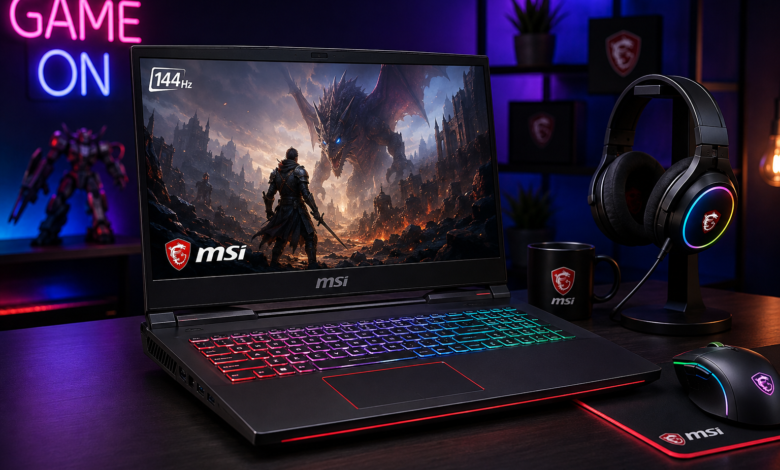
An MSI gaming laptop can give players strong PC gaming performance without tying them to a desk. MSI’s range includes large performance machines, thinner notebooks, and more affordable gaming systems. The challenge is choosing the right configuration: the GPU, processor, display, cooling, memory, and storage can matter more than the series name.
MSI offers Titan, Raider, Vector, Stealth, Katana, and Cyborg families, each balancing performance, portability, design, and price.

Why choose an MSI gaming laptop?
The main advantage is variety. Buyers who want maximum performance can choose larger flagship systems, while commuters may prefer a slimmer notebook. More affordable models provide another entry point for PC gaming.
For most demanding games, an MSI gaming laptop’s graphics processor deserves serious attention. A discrete GPU has a major effect on frame rates and graphical settings. NVIDIA GeForce RTX graphics appear across many current configurations, but the exact GPU and laptop power configuration still need checking.
The display is equally important. Competitive players may prefer a high refresh rate, while single-player gaming and creative work can benefit more from resolution, brightness, contrast, and color quality.
MSI gaming laptop series explained
Titan: A performance-first family for buyers who want powerful hardware and do not mind a larger chassis. It suits demanding gaming and heavy workloads.
Raider: Another high-performance option with a feature-rich gaming design. It is better suited to desk-based use than frequent travel.
Vector: Focuses strongly on performance and can be a practical choice for gamers who care more about hardware capability than ultra-thin construction.
Stealth: Takes a slimmer, more understated approach. It can suit people who want one machine for gaming, study, and work.
Katana: Aimed at buyers seeking gaming performance at a more accessible price. Check the complete configuration because hardware can vary.
Cyborg: Emphasizes portability and a distinctive design. The exact GPU, processor, display, and memory should determine whether it fits your needs.
MSI’s U.S. website lists notebooks among its major product categories, while regional sites demonstrate that configurations can vary by market. Check the exact model number before buying in the USA or UK.
Specifications that matter most
| Component | What to prioritize | Why it matters |
|---|---|---|
| GPU | Modern discrete RTX-class graphics | Major gaming performance factor |
| CPU | Current Core or Ryzen processor | Gaming and multitasking |
| RAM | 16GB or more | Handles games and background apps |
| Storage | 1TB SSD when affordable | More room for large games |
| Display | High refresh rate and good panel | Smoother, better-looking gameplay |
| Cooling | Effective fans and heat management | Sustained performance |
Do not compare CPUs by their names alone. Cooling, power limits, memory, and the paired GPU can change real-world performance. Laptop and desktop graphics versions with related names are also not automatically equivalent.
For many buyers, 16GB RAM is a practical starting point, while a 1TB SSD is useful for a growing library. Upgradeable memory or storage can improve long-term value.
💡 Pro Tip
Search the complete model number before purchasing. One series can contain several configurations, with major differences in GPU, processor, display, RAM, and SSD. Comparing the full specification sheet helps prevent paying extra for hardware you do not need.
Can it handle school and work?
Yes. A capable MSI gaming laptop can handle programming, office software, graphic design, video editing, and other demanding applications. Strong processors, sufficient memory, fast storage, and discrete graphics make gaming notebooks useful beyond entertainment.
The trade-off is portability. Performance-focused machines can be heavier than ordinary laptops, and battery life varies with hardware and workload.
If you travel frequently, a slimmer model may be more practical. If the computer stays mostly on a desk, a larger performance system can make more sense.
How much should you spend?
There is no single ideal price. Value depends on the hardware included.
For a budget system, prioritize the GPU and adequate RAM instead of paying for cosmetic extras. In the mid-range, seek a balanced GPU, CPU, display, and SSD. Premium models make sense when you specifically need higher performance, advanced displays, stronger cooling, or premium construction.
U.S. and UK configurations can differ, so compare exact specifications.
Mistakes to avoid
Do not spend most of your budget on the CPU while neglecting the GPU. For demanding games, graphics capability is critical.
Do not choose a display only because it has an impressive refresh rate. High refresh rates are most useful when the hardware can produce sufficiently high frame rates.
Cooling also deserves attention. Gaming creates sustained loads, so reputable long-session testing can reveal temperatures and fan behavior that a specification sheet cannot.
Finally, check ports and upgrade options. USB connectivity, external-display support, networking, webcam quality, memory slots, and SSD expansion can matter after purchase.
📌 Key Takeaway
The best MSI gaming laptop is the one that matches your actual workload. Prioritize the GPU, then balance it with a suitable display, enough RAM and storage, effective cooling, and acceptable weight. The complete configuration matters more than the series name.
Frequently Asked Questions
Is MSI a good brand for gaming laptops?
MSI is an established PC hardware manufacturer with a broad notebook portfolio. Its gaming range covers different budgets and performance levels. Individual models can differ substantially, so compare the complete configuration and reliable reviews instead of judging a laptop only by its brand.
Is 16GB RAM enough for an MSI gaming laptop?
For many games and everyday applications, 16GB is a sensible starting point. It leaves room for browsers, launchers, voice chat, and background software. Heavy creative workloads or extensive multitasking may justify more memory if the particular laptop supports an upgrade.
Which MSI series is best for high-performance gaming?
Titan and Raider are designed for buyers focused on high-end performance, while Vector is another performance-oriented option. The exact GPU, CPU, display, cooling, and memory should still be compared because specifications can vary significantly between configurations.
Are MSI gaming laptops good for students?
Yes, particularly for students studying programming, design, engineering, media, or other demanding subjects. The main drawback is weight. If you carry a computer every day, portability and battery behavior deserve more attention than they would for a desk-based setup.
Is a gaming laptop better than a desktop?
A laptop is convenient when portability matters, while a desktop usually offers easier upgrades. If you need one machine for gaming, study, travel, and work, an MSI gaming laptop can be practical. If mobility is irrelevant, a desktop may offer better long-term value.
Making the final decision
Start with your games, applications, and budget. Choose the strongest GPU that fits it without sacrificing a decent display, sufficient RAM, and SSD storage. Then consider cooling, ports, weight, battery expectations, and upgradeability.
For many buyers, a balanced configuration is more sensible than a flagship. A well-chosen MSI gaming laptop can serve as both a gaming machine and an everyday computer. Compare the full specification and verify the exact model sold in your market before ordering.





One Comment