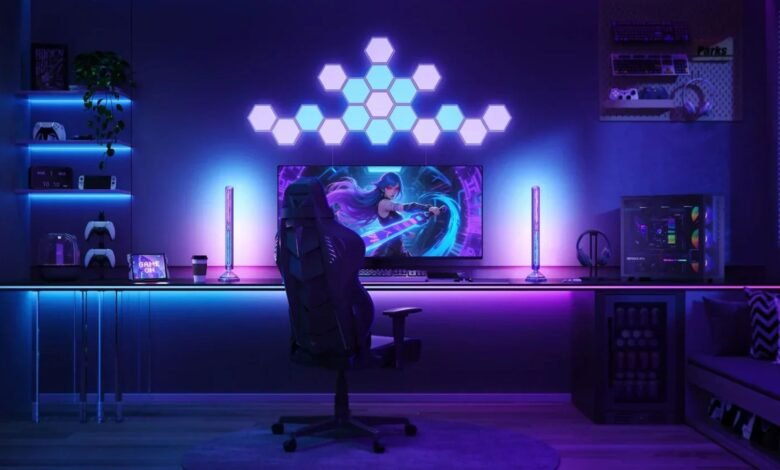
A great gaming space is more than a desk with expensive equipment. The right gaming setup ideas combine comfort, performance, organization, and personal style to create an environment where players can focus for longer sessions. A well-planned setup can improve posture, reduce distractions, and make everyday gaming more enjoyable.
The best approach depends on your room size, budget, gaming habits, and the devices you use. A competitive PC player may prioritize monitor positioning and cable management, while a console gamer may focus on seating, audio, and display quality. The goal is to create a practical space that fits your needs instead of simply copying a popular design.


Gaming setup ideas that balance style and functionality
A strong gaming setup starts with the essentials: a reliable desk, comfortable seating, suitable lighting, and organized equipment placement. A visually impressive room can still become frustrating if cables are tangled, screens are poorly positioned, or the chair creates discomfort.
Start by measuring your available space. Small rooms often benefit from compact desks, wall-mounted accessories, and vertical storage solutions. Larger rooms allow more flexibility, including separate areas for gaming, streaming, collecting equipment, or relaxing.
Your desk layout should support natural movement. Keep frequently used items within reach, position the monitor at a comfortable viewing angle, and avoid placing accessories where they create clutter.
Choosing the right gaming desk and chair
The desk is the foundation of your gaming area. Look for enough surface space for your monitor, keyboard, mouse, speakers, and other accessories. Adjustable-height desks are becoming popular because they allow users to change positions during long sessions.
A gaming chair should provide proper support rather than only matching the room’s appearance. Features such as adjustable armrests, lumbar support, and breathable materials can make extended play sessions more comfortable.
Lighting that enhances the atmosphere
Lighting plays a major role in the appearance and usability of a gaming room. RGB strips, desk lamps, and ambient lighting can create different moods, but brightness control matters. Excessive lighting behind screens can cause distraction or eye strain.
A balanced setup usually combines functional lighting with decorative elements. A soft background glow behind a monitor can add visual depth without overpowering the main screen.
Hardware placement and organization
Equipment placement affects both performance and convenience. Keep monitors centered with your primary viewing position, arrange controllers and accessories in dedicated storage areas, and avoid blocking airflow around computers or consoles.
Cable management is one of the simplest improvements that can transform a room. Cable clips, sleeves, and under-desk trays help maintain a cleaner appearance and make future upgrades easier.
| Setup Element | Recommended Approach | Main Benefit |
|---|---|---|
| Desk | Choose a size that fits your equipment and room | Better organization and movement |
| Chair | Prioritize support and adjustability | Improved comfort during long sessions |
| Monitor | Position at eye level and suitable distance | Reduced strain and better viewing |
| Lighting | Combine ambient and task lighting | Better atmosphere and visibility |
| Storage | Use shelves, drawers, or mounts | Less clutter and easier access |
💡 Pro Tip
Place your most-used accessories based on frequency, not appearance. For example, keep controllers, headphones, and charging cables within easy reach while storing less-used items elsewhere. This small adjustment makes the setup feel more efficient every day.
Creating a setup based on your gaming style
Different players need different environments. Competitive gamers often benefit from fast monitors, responsive peripherals, and minimal distractions. Streamers may need additional space for microphones, cameras, lighting equipment, and background design.
Console-focused rooms often prioritize entertainment comfort. A quality television, comfortable seating, and organized media storage can create a more relaxed experience.
Creative players who record videos, design content, or stream gameplay may need stronger organization systems. A dedicated microphone arm, monitor arrangement, and acoustic improvements can make the workspace more professional.
Budget planning also matters. Expensive equipment does not automatically create a better experience. A carefully arranged affordable setup can often feel more enjoyable than a costly room with poor planning.
Many gaming setup ideas focus heavily on appearance, but practical improvements usually provide the biggest long-term benefits. Better cable organization, ergonomic adjustments, and smarter equipment placement often matter more than decorative upgrades.
📌 Key Takeaway
The strongest gaming spaces are built around the player’s habits. Prioritize comfort, organization, and useful equipment upgrades before spending money on decorative features.
Frequently Asked Questions
What should every gaming setup include?
A basic gaming setup should include a comfortable desk, supportive chair, suitable display, reliable input devices, and proper organization. Additional features such as lighting, speakers, and decorative accessories can improve the experience, but they should come after the essential equipment is handled.
How can I improve my gaming setup without spending much money?
Small upgrades can make a noticeable difference. Start with cable management, improved lighting placement, desk organization, and better positioning of existing equipment. Rearranging your space often creates a cleaner and more comfortable environment without requiring major purchases.
What are some gaming setup ideas for a small room?
Small rooms benefit from space-saving solutions such as compact desks, monitor arms, wall shelves, and multifunctional furniture. Keeping the floor area open and using vertical storage can make the room feel larger while still supporting a complete gaming experience.
Is RGB lighting necessary for a gaming room?
RGB lighting is optional and mainly affects appearance. It can personalize a room and create atmosphere, but it does not directly improve gaming performance. Functional lighting that reduces glare and supports comfortable viewing is usually more valuable.
How do I make my gaming setup look professional?
A professional-looking setup usually comes from consistency. Matching colors, reducing visible cables, arranging equipment neatly, and maintaining a clean desk surface can create a polished appearance even with mid-range hardware.
Conclusion
Building a gaming space is about creating an environment that supports the way you play. The most effective gaming setup ideas focus on comfort, organization, and thoughtful equipment choices rather than simply adding more technology. A well-designed setup should feel personal, practical, and enjoyable every time you sit down to play.